顯示具有 AutoPlay Menu Builder 標籤的文章。 顯示所有文章

2013年7月25日 星期四

Portable AutoPlay Menu Builder 7.1.0.2278

[軟體名稱] AutoPlay Menu Builder
[版本語言] v7.1.0 Build 2278   英語版
[官方網頁] www.linasoft.com
[隨身封裝] 7z 這裡 或 這裡 (13.5 MB)
[隨身免裝] 7z 這裡 或 這裡 (11.2 MB)
[解壓密碼] 無
[軟體概要] Linasoft 出品的可製做隨身應用程式/自動啟動式 CD/安裝映像/啟動式選單的工具軟體


AutoPlay Menu Builder is one of the best tools for creating an automatic playing menu to launch your cd or dvd. No programming experience is necessary! Just click and drag your mouse a few times, and like magic you can build a menu which will pop up when your disc is inserted into the drive. From the menu you can launch applications, open documents, play movies, and do much, much more. This is the simple, elegant solution to your disc creation needs.

Features:
- Just thinking, no programming
- Rapid development environment to create autoplay menus quickly
- Powerful WYSIWYG designer, easy to use without learning
- Easy testing without burning on disc
- Protect menus from being modified by others with password
- Create projects from templates, and create own templates
- Support multi-page window, shaped window and full screen window
- Cool splash screen with shaped, fade in, fade out and animated effects
- Internal slide show support with a large set of effects
- Many kinds of actions such as launching application, open document, etc
- Many cool controls
- Embed Flash Player, Internet Explorer and Windows Media Player in menus
- Standard or customized tool tip while moving cursor over controls
- Text and graphic comments while moving cursor over controls
- Support MP3/MP2/MP1/OGG/WAV/MID/RMI/XM/IT/MOD/S3M files for background music
- Support BMP/PNG/JPG/GIF/PCX/WMF/EMF/ICO images
- Create stand-alone executable files
- Customize disc icon and mouse cursors
- Install specified fonts before loading a menu

p.s.1:隨身封裝
1--用WinRaR解壓到任何地方(或USB)為單一隨身版xxx(ThinApp).exe
2--此版為Thinstall封裝製作,解壓後無法再次解壓
3--已加註容許32位元的軟體執行於64位元

p.s.2:隨身免裝
1--用WinRaR解壓到任何地方(或USB)為單一Portable_xxx.exe
2--此版為WinRaR壓縮製作,也可再用WinRAR將exe檔再次解壓為目錄
3--已破解,內附額外文件與說明

2013年6月23日 星期日

Portable AutoPlay Menu Builder 7.1.0.2256

[軟體名稱] AutoPlay Menu Builder
[版本語言] v7.1.0 Build 2256   英語版
[官方網頁] www.linasoft.com
[隨身封裝] 7z 這裡 或 這裡 (13.4 MB)
[隨身免裝] 7z 這裡 或 這裡 (11.2 MB)
[解壓密碼] 無
[軟體概要] Linasoft 出品的可製做隨身應用程式/自動啟動式 CD/安裝映像/啟動式選單的工具軟體


AutoPlay Menu Builder is one of the best tools for creating an automatic playing menu to launch your cd or dvd. No programming experience is necessary! Just click and drag your mouse a few times, and like magic you can build a menu which will pop up when your disc is inserted into the drive. From the menu you can launch applications, open documents, play movies, and do much, much more. This is the simple, elegant solution to your disc creation needs.

Features:
- Just thinking, no programming
- Rapid development environment to create autoplay menus quickly
- Powerful WYSIWYG designer, easy to use without learning
- Easy testing without burning on disc
- Protect menus from being modified by others with password
- Create projects from templates, and create own templates
- Support multi-page window, shaped window and full screen window
- Cool splash screen with shaped, fade in, fade out and animated effects
- Internal slide show support with a large set of effects
- Many kinds of actions such as launching application, open document, etc
- Many cool controls
- Embed Flash Player, Internet Explorer and Windows Media Player in menus
- Standard or customized tool tip while moving cursor over controls
- Text and graphic comments while moving cursor over controls
- Support MP3/MP2/MP1/OGG/WAV/MID/RMI/XM/IT/MOD/S3M files for background music
- Support BMP/PNG/JPG/GIF/PCX/WMF/EMF/ICO images
- Create stand-alone executable files
- Customize disc icon and mouse cursors
- Install specified fonts before loading a menu

p.s.1:隨身封裝
1--用WinRaR解壓到任何地方(或USB)為單一隨身版xxx(ThinApp).exe
2--此版為Thinstall封裝製作,解壓後無法再次解壓
3--已加註容許32位元的軟體執行於64位元

p.s.2:隨身免裝
1--用WinRaR解壓到任何地方(或USB)為單一Portable_xxx.exe
2--此版為WinRaR壓縮製作,也可再用WinRAR將exe檔再次解壓為目錄
3--內附必要文件與說明

2013年5月6日 星期一

Portable AutoPlay Menu Builder 7.0.2190

[軟體名稱] AutoPlay Menu Builder
[版本語言] v7.0 Build 2190   英語版
[官方網頁] www.linasoft.com
[隨身封裝] 7z 這裡 或 這裡 (13.3 MB)
[隨身免裝] 7z 這裡 或 這裡 (10.4 MB)
[解壓密碼] 無
[軟體概要] Linasoft 出品的可製做隨身應用程式/自動啟動式 CD/安裝映像/啟動式選單的工具軟體


AutoPlay Menu Builder is one of the best tools for creating an automatic playing menu to launch your cd or dvd. No programming experience is necessary! Just click and drag your mouse a few times, and like magic you can build a menu which will pop up when your disc is inserted into the drive. From the menu you can launch applications, open documents, play movies, and do much, much more. This is the simple, elegant solution to your disc creation needs.

Features:
- Just thinking, no programming
- Rapid development environment to create autoplay menus quickly
- Powerful WYSIWYG designer, easy to use without learning
- Easy testing without burning on disc
- Protect menus from being modified by others with password
- Create projects from templates, and create own templates
- Support multi-page window, shaped window and full screen window
- Cool splash screen with shaped, fade in, fade out and animated effects
- Internal slide show support with a large set of effects
- Many kinds of actions such as launching application, open document, etc
- Many cool controls
- Embed Flash Player, Internet Explorer and Windows Media Player in menus
- Standard or customized tool tip while moving cursor over controls
- Text and graphic comments while moving cursor over controls
- Support MP3/MP2/MP1/OGG/WAV/MID/RMI/XM/IT/MOD/S3M files for background music
- Support BMP/PNG/JPG/GIF/PCX/WMF/EMF/ICO images
- Create stand-alone executable files
- Customize disc icon and mouse cursors
- Install specified fonts before loading a menu

p.s.1:隨身封裝
1--用WinRaR解壓到任何地方(或USB)為單一隨身版xxx(ThinApp).exe
2--此版為Thinstall封裝製作,解壓後無法再次解壓
3--已加註容許32位元的軟體執行於64位元

p.s.2:隨身免裝
1--用WinRaR解壓到任何地方(或USB)為單一Portable_xxx.exe
2--此版為WinRaR壓縮製作,也可再用WinRAR將exe檔再次解壓為目錄
3--內附必要文件與說明

2011年9月20日 星期二

Portable AutoPlay Menu Builder 6.2.1954

[軟體名稱] AutoPlay Menu Builder
[版本語言] v6.2 Build 1954 英語版
[官方網頁] http://www.linasoft.com/
[隨身封裝] 7z 點我下載 (7.1 MB - 30天免空下載限制)
[隨身免裝] 7z 點我下載 (7.6 MB - 30天免空下載限制)
[解壓密碼] 無
[軟體概要] Linasoft 出品的可製做隨身應用程式/自動啟動式 CD/安裝映像/啟動式選單的工具軟體


AutoPlay Menu Builder is one of the best tools for creating an automatic playing menu to launch your cd or dvd. No programming experience is necessary! Just click and drag your mouse a few times, and like magic you can build a menu which will pop up when your disc is inserted into the drive. From the menu you can launch applications, open documents, play movies, and do much, much more. This is the simple, elegant solution to your disc creation needs.

Features:
- Just thinking, no programming
- Rapid development environment to create autoplay menus quickly
- Powerful WYSIWYG designer, easy to use without learning
- Easy testing without burning on disc
- Protect menus from being modified by others with password
- Create projects from templates, and create own templates
- Support multi-page window, shaped window and full screen window
- Cool splash screen with shaped, fade in, fade out and animated effects
- Internal slide show support with a large set of effects
- Many kinds of actions such as launching application, open document, etc
- Many cool controls
- Embed Flash Player, Internet Explorer and Windows Media Player in menus
- Standard or customized tool tip while moving cursor over controls
- Text and graphic comments while moving cursor over controls
- Support MP3/MP2/MP1/OGG/WAV/MID/RMI/XM/IT/MOD/S3M files for background music
- Support BMP/PNG/JPG/GIF/PCX/WMF/EMF/ICO images
- Create stand-alone executable files
- Customize disc icon and mouse cursors
- Install specified fonts before loading a menu


p.s.1:隨身封裝
1--用WinRaR解壓到任何地方(或USB)為單一隨身版xxx(ThinApp).exe
2--此版為Thinstall封裝製作,解壓後無法再次解壓
3--已加註容許32位元的軟體執行於64位元


p.s.2:隨身免裝
1--用WinRaR解壓到任何地方(或USB)為單一Portable_xxx.exe
2--此版為AutoRUn壓縮製作,也可再用WinRAR將exe檔再次解壓為目錄
3--內附必要文件與說明


2011年7月26日 星期二

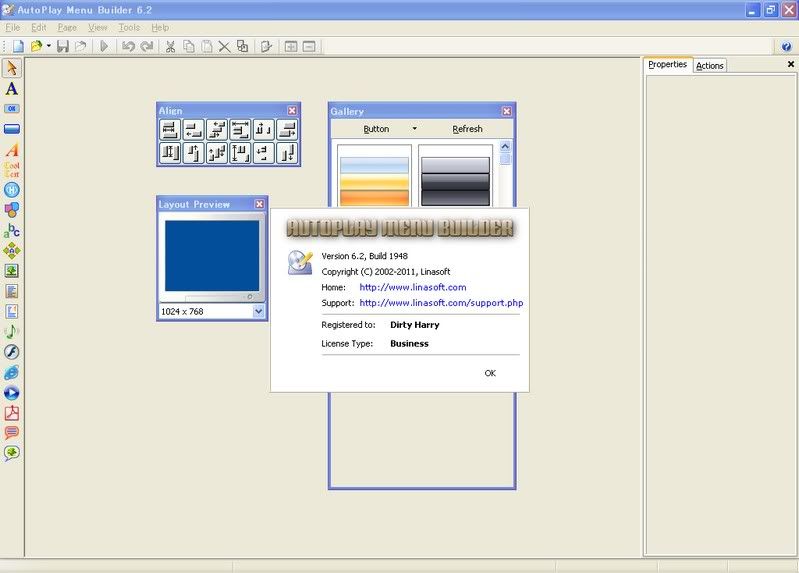
Portable AutoPlay Menu Builder 6.2.1948

[軟體名稱] AutoPlay Menu Builder
[版本語言] v6.2 Build 1948   英語版
[官方網頁] http://www.linasoft.com/apmbuilder.php
[隨身封裝] 7z  點我下載 (7.2 MB - 30天免空下載限制)
[隨身免裝] 7z  點我下載 (7.0 MB - 30天免空下載限制)
[解壓密碼] 無
[軟體概要] Linasoft 出品簡單易用的光碟選單製作工具軟體


AutoPlay Menu Builder  is one of the best tools for  creating an automatic playing menu to launch your CDROM. No programming experience is necessary! Just click and drag your mouse a few times,  and like magic  you can build a menu which will pop up when your CDROM is inserted into the drive.  From
the menu you can launch applications, open documents, play movies,  and do much, much more. This is a simple, elegant solution to your CDROM creation needs.

-Just Think, No Programming!
-Fast Development Times!
-Create Your Own Templates!
-Auto Play!
-Easy Testing!
-Multiple Nested Menus!
-Cool Splash Screens!
-Background Music!
-Many Cool Controls!
-Internal Slide Show!

[註] 這個軟體就是目前我用來製作隨身免裝版的工具之一


p.s.1:隨身封裝
1--用WinRaR解壓到任何地方(或USB)為單一隨身版xxx(ThinApp).exe
2--此為壓縮封裝製作,解壓後無法再次解壓
3--此版已加註x64系統於執行x32系統的程式,有使用者可回應


p.s.2:隨身免裝
1--用WinRaR解壓到任何地方(或USB)為單一Portable_xxx.exe
2--也可再用WinRar將Portable_xxx.exe解壓為資料匣,成為免安裝版
3--此為AutoRun壓縮製作,内附必要文件與説明

2011年3月8日 星期二

Portable AutoPlay Menu Builder 6.1.1916

[軟體名稱] AutoPlay Menu Builder
[版本語言] v6.1 Build 1916  英語版
[官方網頁] http://www.linasoft.com/apmbuilder.php
[隨身封裝] 7z  點我下載 (6.6 MB - 30天免空下載限制)
[隨身免裝] 7z  點我下載 (5.1 MB - 30天免空下載限制)
[解壓密碼] 無
[軟體概要] Linasoft 出品簡單易用的光碟選單製作工具軟體


AutoPlay Menu Builder  is one of the best tools for  creating an automatic playing menu to launch your CDROM. No programming experience is necessary! Just click and drag your mouse a few times,  and like magic  you can build a menu which will pop up when your CDROM is inserted into the drive.  From
the menu you can launch applications, open documents, play movies,  and do much, much more. This is a simple, elegant solution to your CDROM creation needs.

-Just Think, No Programming!
-Fast Development Times!
-Create Your Own Templates!
-Auto Play!
-Easy Testing!
-Multiple Nested Menus!
-Cool Splash Screens!
-Background Music!
-Many Cool Controls!
-Internal Slide Show!

p.s.1:隨身封裝
1--用WinRaR解壓到任何地方(或USB)為單一隨身版xxx(ThinApp).exe
2--此為壓縮封裝製作,解壓後無法再次解壓

p.s.2:隨身免裝
1--用WinRaR解壓到任何地方(或USB)為單一隨身版Portable_xxx.exe
2--也可再用WinRar將Portable_xxx.exe解壓為資料匣,成為免安裝版(建議方式,起動較快)
3--内附必要文件與説明