顯示具有 GiliSoft Video Editor 標籤的文章。 顯示所有文章

2013年11月5日 星期二

Portable GiliSoft Video Editor 5.2.0 (x86/x64)

[軟體名稱] GiliSoft Video Editor
[版本語言] v5.2.0   英語版 (x86/x64)
[官方網頁] www.gilisoft.com
[隨身免裝] 7z x86 或 x86 (16.2 MB) / x64 或 x64 (16.3 MB)
[解壓密碼] 無
[軟體概要] GiliSoft 出品的影音編輯工具軟體


No need to be worried about formats, frame rate or file sizes, the functions of video join, split and cut can be easily achieved by Gilisoft Video Editor. The video editing software allows you to edit video files in various formats like AVI, MPEG, H.264, SWF, MOV, WMV, etc. for playback on popular devices like iPod, iPhone, PSP, PS3, and so on. The three processes, video join, split and cut, can run in background without too much space occupation.
As a video joiner, splitter and cutter, Gilisoft Video Editor has an intuitive interface and makes it easy to turn original videos into works of art. And also you can watch the video in the preview window. Gilisoft Video Editor is well worthy of having a try.

-Join multiple videos and combine them into one
-Split one video into several segments
-Cut off the unwanted segments of your video
-Crop off the unwanted regions of your video
-Add subtitle and watermark to your video

p.s.:隨身免裝
1--用WinRaR解壓到任何地方(或USB)為單一Portable_xxx.exe
2--此版為WinRAR壓縮製作,也可再用WinRAR再次解壓為目錄
3--已破解,內附額外文件與說明

2013年10月18日 星期五

Portable GiliSoft Video Editor 5.1.0

[軟體名稱] GiliSoft Video Editor
[版本語言] v5.1.0   英語版
[官方網頁] www.gilisoft.com
[隨身免裝] 7z 這裡 或 這裡 (16.4 MB)
[解壓密碼] 無
[軟體概要] GiliSoft 出品的影音編輯工具軟體


No need to be worried about formats, frame rate or file sizes, the functions of video join, split and cut can be easily achieved by Gilisoft Video Editor. The video editing software allows you to edit video files in various formats like AVI, MPEG, H.264, SWF, MOV, WMV, etc. for playback on popular devices like iPod, iPhone, PSP, PS3, and so on. The three processes, video join, split and cut, can run in background without too much space occupation.
As a video joiner, splitter and cutter, Gilisoft Video Editor has an intuitive interface and makes it easy to turn original videos into works of art. And also you can watch the video in the preview window. Gilisoft Video Editor is well worthy of having a try.

-Join multiple videos and combine them into one
-Split one video into several segments
-Cut off the unwanted segments of your video
-Crop off the unwanted regions of your video
-Add subtitle and watermark to your video

p.s.:隨身免裝
1--用WinRaR解壓到任何地方(或USB)為單一Portable_xxx.exe
2--此版為WinRAR壓縮製作,也可再用WinRAR再次解壓為目錄
3--已破解,內附額外文件與說明

2013年8月19日 星期一

Portable GiliSoft Video Editor 4.6.0

[軟體名稱] GiliSoft Video Editor
[版本語言] v4.6.0   英語版
[官方網頁] www.gilisoft.com
[隨身封裝] 7z 這裡 或 這裡 (18.8 MB)
[隨身免裝] 7z 這裡 或 這裡 (16.9 MB)
[解壓密碼] 無
[軟體概要] GiliSoft 出品的影音編輯工具軟體


No need to be worried about formats, frame rate or file sizes, the functions of video join, split and cut can be easily achieved by Gilisoft Video Editor. The video editing software allows you to edit video files in various formats like AVI, MPEG, H.264, SWF, MOV, WMV, etc. for playback on popular devices like iPod, iPhone, PSP, PS3, and so on. The three processes, video join, split and cut, can run in background without too much space occupation.
As a video joiner, splitter and cutter, Gilisoft Video Editor has an intuitive interface and makes it easy to turn original videos into works of art. And also you can watch the video in the preview window. Gilisoft Video Editor is well worthy of having a try.

-Join multiple videos and combine them into one
-Split one video into several segments
-Cut off the unwanted segments of your video
-Crop off the unwanted regions of your video
-Add subtitle and watermark to your video

p.s.1:隨身封裝
1--用WinRaR解壓到任何地方(或USB)為單一隨身版xxx(ThinApp).exe
2--此版為Thinstall封裝製作,解壓後無法再次解壓
3--已加註容許32位元的軟體執行於64位元

p.s.2:隨身免裝
1--用WinRaR解壓到任何地方(或USB)為單一Portable_xxx.exe
2--此版為WinRAR壓縮製作,也可再用WinRAR再次解壓為目錄
3--已破解,內附額外文件與說明

2013年8月7日 星期三

Portable GiliSoft Video Editor 4.5.0

[軟體名稱] GiliSoft Video Editor
[版本語言] v4.5.0   英語版
[官方網頁] www.gilisoft.com
[隨身封裝] 7z 這裡 或 這裡 (18.8 MB)
[隨身免裝] 7z 這裡 或 這裡 (16.7 MB)
[解壓密碼] 無
[軟體概要] GiliSoft 出品的影音編輯工具軟體


No need to be worried about formats, frame rate or file sizes, the functions of video join, split and cut can be easily achieved by Gilisoft Video Editor. The video editing software allows you to edit video files in various formats like AVI, MPEG, H.264, SWF, MOV, WMV, etc. for playback on popular devices like iPod, iPhone, PSP, PS3, and so on. The three processes, video join, split and cut, can run in background without too much space occupation.
As a video joiner, splitter and cutter, Gilisoft Video Editor has an intuitive interface and makes it easy to turn original videos into works of art. And also you can watch the video in the preview window. Gilisoft Video Editor is well worthy of having a try.

-Join multiple videos and combine them into one
-Split one video into several segments
-Cut off the unwanted segments of your video
-Crop off the unwanted regions of your video
-Add subtitle and watermark to your video

p.s.1:隨身封裝
1--用WinRaR解壓到任何地方(或USB)為單一隨身版xxx(ThinApp).exe
2--此版為Thinstall封裝製作,解壓後無法再次解壓
3--已加註容許32位元的軟體執行於64位元

p.s.2:隨身免裝
1--用WinRaR解壓到任何地方(或USB)為單一Portable_xxx.exe
2--此版為WinRAR壓縮製作,也可再用WinRAR再次解壓為目錄
3--已破解,內附額外文件與說明

2013年7月21日 星期日

Portable GiliSoft Video Editor 4.3.0

[軟體名稱] GiliSoft Video Editor
[版本語言] v4.3.0   英語版
[官方網頁] www.gilisoft.com
[隨身封裝] 7z 這裡 或 這裡 (18.8 MB)
[隨身免裝] 7z 這裡 或 這裡 (18.1 MB)
[解壓密碼] 無
[軟體概要] GiliSoft 出品的影音編輯工具軟體


No need to be worried about formats, frame rate or file sizes, the functions of video join, split and cut can be easily achieved by Gilisoft Video Editor. The video editing software allows you to edit video files in various formats like AVI, MPEG, H.264, SWF, MOV, WMV, etc. for playback on popular devices like iPod, iPhone, PSP, PS3, and so on. The three processes, video join, split and cut, can run in background without too much space occupation.
As a video joiner, splitter and cutter, Gilisoft Video Editor has an intuitive interface and makes it easy to turn original videos into works of art. And also you can watch the video in the preview window. Gilisoft Video Editor is well worthy of having a try.

-Join multiple videos and combine them into one
-Split one video into several segments
-Cut off the unwanted segments of your video
-Crop off the unwanted regions of your video
-Add subtitle and watermark to your video

p.s.1:隨身封裝
1--用WinRaR解壓到任何地方(或USB)為單一隨身版xxx(ThinApp).exe
2--此版為Thinstall封裝製作,解壓後無法再次解壓
3--此為 x86 版本,已加註容許32位元的軟體執行於64位元

p.s.2:隨身免裝
1--用WinRaR解壓到任何地方(或USB)為單一Portable_xxx.exe
2--此版為WinRAR壓縮製作,也可再用WinRAR再次解壓為目錄
3--已破解,內附額外文件與說明

2013年6月12日 星期三

Portable GiliSoft Video Editor 4.0.1

[軟體名稱] GiliSoft Video Editor
[版本語言] v4.0.1   英語版
[官方網頁] www.gilisoft.com
[隨身封裝] 7z 這裡 或 這裡 (15.6 MB)
[隨身免裝] 7z 這裡 或 這裡 (16.7 MB)
[解壓密碼] 無
[軟體概要] GiliSoft 出品的影音編輯工具軟體


No need to be worried about formats, frame rate or file sizes, the functions of video join, split and cut can be easily achieved by Gilisoft Video Editor. The video editing software allows you to edit video files in various formats like AVI, MPEG, H.264, SWF, MOV, WMV, etc. for playback on popular devices like iPod, iPhone, PSP, PS3, and so on. The three processes, video join, split and cut, can run in background without too much space occupation.
As a video joiner, splitter and cutter, Gilisoft Video Editor has an intuitive interface and makes it easy to turn original videos into works of art. And also you can watch the video in the preview window. Gilisoft Video Editor is well worthy of having a try.

-Join multiple videos and combine them into one
-Split one video into several segments
-Cut off the unwanted segments of your video
-Crop off the unwanted regions of your video
-Add subtitle and watermark to your video

p.s.1:隨身封裝
1--用WinRaR解壓到任何地方(或USB)為單一隨身版xxx(ThinApp).exe
2--此版為Thinstall封裝製作,解壓後無法再次解壓
3--此為 x86 版本,已加註容許32位元的軟體執行於64位元

p.s.2:隨身免裝
1--用WinRaR解壓到任何地方(或USB)為單一Portable_xxx.exe
2--此版為WinRAR壓縮製作,也可再用WinRAR再次解壓為目錄
3--已破解,內附額外文件與說明

2013年5月20日 星期一

Portable GiliSoft Video Editor 3.9.0

[軟體名稱] GiliSoft Video Editor
[版本語言] v3.9.0   英語版
[官方網頁] www.gilisoft.com
[隨身封裝] 7z 這裡 或 這裡 (16.1 MB)
[隨身免裝] 7z 這裡 或 這裡 (16.6 MB)
[解壓密碼] 無
[軟體概要] GiliSoft 出品的影音編輯工具軟體


No need to be worried about formats, frame rate or file sizes, the functions of video join, split and cut can be easily achieved by Gilisoft Video Editor. The video editing software allows you to edit video files in various formats like AVI, MPEG, H.264, SWF, MOV, WMV, etc. for playback on popular devices like iPod, iPhone, PSP, PS3, and so on. The three processes, video join, split and cut, can run in background without too much space occupation.
As a video joiner, splitter and cutter, Gilisoft Video Editor has an intuitive interface and makes it easy to turn original videos into works of art. And also you can watch the video in the preview window. Gilisoft Video Editor is well worthy of having a try.

-Join multiple videos and combine them into one
-Split one video into several segments
-Cut off the unwanted segments of your video
-Crop off the unwanted regions of your video
-Add subtitle and watermark to your video

p.s.1:隨身封裝
1--用WinRaR解壓到任何地方(或USB)為單一隨身版xxx(ThinApp).exe
2--此版為Thinstall封裝製作,解壓後無法再次解壓
3--此為 x86 版本,已加註容許32位元的軟體執行於64位元

p.s.2:隨身免裝
1--用WinRaR解壓到任何地方(或USB)為單一Portable_xxx.exe
2--此版為WinRAR壓縮製作,也可再用WinRAR再次解壓為目錄
3--已破解,內附額外文件與說明
2013年3月13日 星期三

Portable GiliSoft Video Editor 3.5.0

[軟體名稱] GiliSoft Video Editor
[版本語言] v3.5.0   英語版
[官方網頁] www.gilisoft.com
[隨身封裝] 7z 這裡 (13.8 MB)
[隨身免裝] 7z 這裡 (16.0 MB)
[解壓密碼] 無
[軟體概要] GiliSoft 出品的影音編輯工具軟體


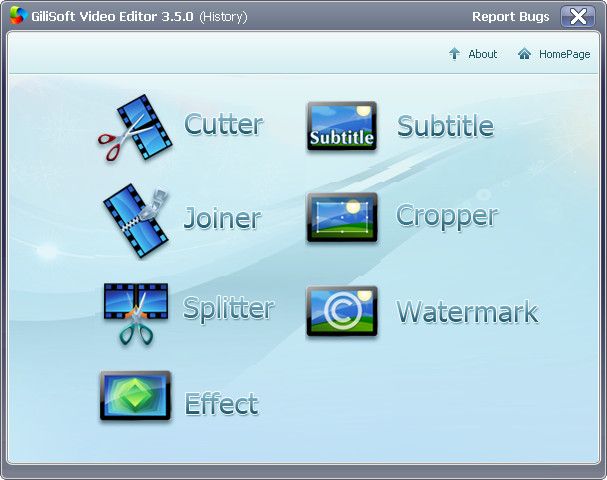
No need to be worried about formats, frame rate or file sizes, the functions of video join, split and cut can be easily achieved by Gilisoft Video Editor. The video editing software allows you to edit video files in various formats like AVI, MPEG, H.264, SWF, MOV, WMV, etc. for playback on popular devices like iPod, iPhone, PSP, PS3, and so on. The three processes, video join, split and cut, can run in background without too much space occupation.
As a video joiner, splitter and cutter, Gilisoft Video Editor has an intuitive interface and makes it easy to turn original videos into works of art. And also you can watch the video in the preview window. Gilisoft Video Editor is well worthy of having a try.

-Join multiple videos and combine them into one
-Split one video into several segments
-Cut off the unwanted segments of your video
-Crop off the unwanted regions of your video
-Add subtitle and watermark to your video

p.s.1:隨身封裝
1--用WinRaR解壓到任何地方(或USB)為單一隨身版xxx(ThinApp).exe
2--此版為Thinstall封裝製作,解壓後無法再次解壓
3--此為 x86 版本,已加註容許32位元的軟體執行於64位元

p.s.2:隨身免裝
1--用WinRaR解壓到任何地方(或USB)為單一Portable_xxx.exe
2--此版為WinRAR壓縮製作,也可再用WinRAR再次解壓為目錄
3--已破解,內附額外文件與說明

2012年11月27日 星期二

Portable GiliSoft Video Editor 3.3.0

[軟體名稱] GiliSoft Video Editor
[版本語言] v3.3.0          英語版
[官方網頁] www.gilisoft.com
[隨身封裝] 7z 這裡 (13.2 MB)
[隨身免裝] 7z 這裡 (15.3 MB)
[解壓密碼] 無
[儲放時間] 免空限制 - 30 天無人下載自動刪除
[軟體概要] GiliSoft 出品的影音編輯工具軟體


No need to be worried about formats, frame rate or file sizes, the functions of video join, split and cut can be easily achieved by Gilisoft Video Editor. The video editing software allows you to edit video files in various formats like AVI, MPEG, H.264, SWF, MOV, WMV, etc. for playback on popular devices like iPod, iPhone, PSP, PS3, and so on. The three processes, video join, split and cut, can run in background without too much space occupation.
As a video joiner, splitter and cutter, Gilisoft Video Editor has an intuitive interface and makes it easy to turn original videos into works of art. And also you can watch the video in the preview window. Gilisoft Video Editor is well worthy of having a try.

-Join multiple videos and combine them into one
-Split one video into several segments
-Cut off the unwanted segments of your video
-Crop off the unwanted regions of your video
-Add subtitle and watermark to your video

p.s.1:隨身封裝
1--用WinRaR解壓到任何地方(或USB)為單一隨身版xxx(ThinApp).exe
2--此版為Thinstall封裝製作,解壓後無法再次解壓
3--此為 x86 版本,已加註容許32位元的軟體執行於64位元


p.s.2:隨身免裝
1--用WinRaR解壓到任何地方(或USB)為單一Portable_xxx.exe
2--此版為WinRAR壓縮製作,也可再用WinRAR再次解壓為目錄
3--已破解,內附額外文件與說明

2012年11月8日 星期四

Portable GiliSoft Video Editor 3.2.0

[軟體名稱] GiliSoft Video Editor
[版本語言] v3.2.0          英語版
[官方網頁] www.gilisoft.com
[隨身封裝] 7z 這裡 (12.1 MB)
[隨身免裝] 7z 這裡 (14.5 MB)
[解壓密碼] 無
[軟體概要] GiliSoft 出品的影音編輯工具軟體


No need to be worried about formats, frame rate or file sizes, the functions of video join, split and cut can be easily achieved by Gilisoft Video Editor. The video editing software allows you to edit video files in various formats like AVI, MPEG, H.264, SWF, MOV, WMV, etc. for playback on popular devices like iPod, iPhone, PSP, PS3, and so on. The three processes, video join, split and cut, can run in background without too much space occupation.
As a video joiner, splitter and cutter, Gilisoft Video Editor has an intuitive interface and makes it easy to turn original videos into works of art. And also you can watch the video in the preview window. Gilisoft Video Editor is well worthy of having a try.

-Join multiple videos and combine them into one
-Split one video into several segments
-Cut off the unwanted segments of your video
-Crop off the unwanted regions of your video
-Add subtitle and watermark to your video

p.s.1:隨身封裝
1--用WinRaR解壓到任何地方(或USB)為單一隨身版xxx(ThinApp).exe
2--此版為Thinstall封裝製作,解壓後無法再次解壓
3--此為 x86 版本,已加註容許32位元的軟體執行於64位元


p.s.2:隨身免裝
1--用WinRaR解壓到任何地方(或USB)為單一Portable_xxx.exe
2--此版為WinRAR壓縮製作,也可再用WinRAR再次解壓為目錄
3--已破解,內附說明