顯示具有 Driver Magician 標籤的文章。 顯示所有文章

2013年11月28日 星期四

Portable Driver Magician 4.0 TW

[軟體名稱] Driver Magician
[版本語言] v4.0  繁中(多語言)版
[官方網頁] www.drivermagician.com
[隨身免裝] 7z 這裡 或 這裡 (3.4 MB)
[解壓密碼] 無
[軟體概要] 實用的驅動程式更新與備份工具軟體


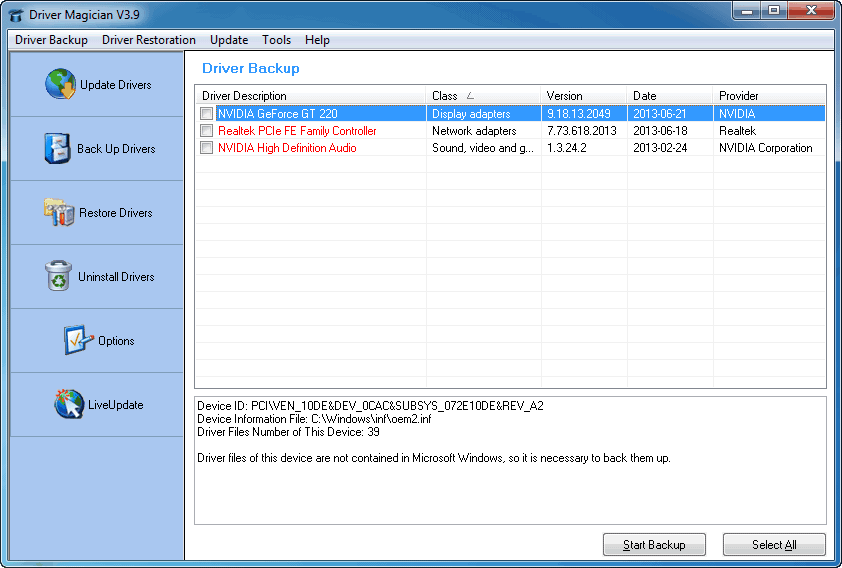
Driver Magician offers a professional solution for device drivers backup, restoration, update and removal in Windows operating system. It identifies all the hardware in the system, extracts their associated drivers from the hard disk and backs them up to a location of your choice. Then when you format and reinstall/upgrade your operating system, you can restore all the "saved" drivers just as if you had the original driver diskettes in your hands. After one system reboot, your PC will be loaded and running with the required hardware drivers.

What's more, Driver Magician has a built in database of the latest drivers with the ability to go to the Internet to receive the driver updates. It saves lots of time to find the correct drivers and mature drivers will obviously increase the performance of hardware. If there are unknown devices in your PC, Driver Magician helps you detect them easily and quickly with its built in hardware identifier database.

Key features:

- Back up device drivers of your computer in four modes.
- Restore device drivers from backup in one mouse click.
- Update device drivers of your PC to improve system performance and stability.
- Uninstall device drivers
- Live Update device identifier database and driver update database.
- Detect unknown devices.
- Back up more items such as My Documents and desktop.
- Restore more items from backup.
- Get detailed information of the hardware drivers.
- Clone all drivers to an auto-setup package (.exe), so you can restore drivers without installing Driver Magician.

p.s.:隨身免裝
1--用WinRaR解壓到任何地方(或USB)為單一Portable_xxx.exe
2--此版為WinRaR壓縮製作,也可再用WinRAR將exe檔再次解壓為目錄
3--內附必要文件與說明

2013年7月5日 星期五

Portable Driver Magician 3.8 DateCode 0207 TW

[軟體名稱] Driver Magician
[版本語言] v3.80 DateCode 0207  繁中(多語言)版
[官方網頁] www.drivermagician.com
[隨身封裝] 7z 這裡 或 這裡 (4.9 MB)
[隨身免裝] 7z 這裡 或 這裡 (3.4 MB)
[解壓密碼] 無
[軟體概要] 實用的驅動程式更新與備份工具軟體


Driver Magician offers a professional solution for device drivers backup, restoration, update and removal in Windows operating system. It identifies all the hardware in the system, extracts their associated drivers from the hard disk and backs them up to a location of your choice. Then when you format and reinstall/upgrade your operating system, you can restore all the "saved" drivers just as if you had the original driver diskettes in your hands. After one system reboot, your PC will be loaded and running with the required hardware drivers.

What's more, Driver Magician has a built in database of the latest drivers with the ability to go to the Internet to receive the driver updates. It saves lots of time to find the correct drivers and mature drivers will obviously increase the performance of hardware. If there are unknown devices in your PC, Driver Magician helps you detect them easily and quickly with its built in hardware identifier database.

Key features:

- Back up device drivers of your computer in four modes.
- Restore device drivers from backup in one mouse click.
- Update device drivers of your PC to improve system performance and stability.
- Uninstall device drivers
- Live Update device identifier database and driver update database.
- Detect unknown devices.
- Back up more items such as My Documents and desktop.
- Restore more items from backup.
- Get detailed information of the hardware drivers.
- Clone all drivers to an auto-setup package (.exe), so you can restore drivers without installing Driver Magician.

p.s.1:隨身封裝
1--用WinRaR解壓到任何地方(或USB)為單一隨身版xxx(ThinApp).exe
2--此版為Thinstall封裝製作,解壓後無法再次解壓
3--已加註容許32位元的軟體執行於64位元

p.s.2:隨身免裝
1--用WinRaR解壓到任何地方(或USB)為單一Portable_xxx.exe
2--此版為WinRaR壓縮製作,也可再用WinRAR將exe檔再次解壓為目錄
3--內附必要文件與說明

2013年5月4日 星期六

Portable Driver Magician 3.80 TW

[軟體名稱] Driver Magician
[版本語言] v3.80 DateCode 0405  繁中(多語言)版
[官方網頁] www.drivermagician.com
[隨身封裝] 7z 這裡 或 這裡 (4.9 MB)
[隨身免裝] 7z 這裡 或 這裡 (3.4 MB)
[解壓密碼] 無
[軟體概要] 實用的驅動程式更新與備份工具軟體


Driver Magician offers a professional solution for device drivers backup, restoration, update and removal in Windows operating system. It identifies all the hardware in the system, extracts their associated drivers from the hard disk and backs them up to a location of your choice. Then when you format and reinstall/upgrade your operating system, you can restore all the "saved" drivers just as if you had the original driver diskettes in your hands. After one system reboot, your PC will be loaded and running with the required hardware drivers.

What's more, Driver Magician has a built in database of the latest drivers with the ability to go to the Internet to receive the driver updates. It saves lots of time to find the correct drivers and mature drivers will obviously increase the performance of hardware. If there are unknown devices in your PC, Driver Magician helps you detect them easily and quickly with its built in hardware identifier database.

Key features:

- Back up device drivers of your computer in four modes.
- Restore device drivers from backup in one mouse click.
- Update device drivers of your PC to improve system performance and stability.
- Uninstall device drivers
- Live Update device identifier database and driver update database.
- Detect unknown devices.
- Back up more items such as My Documents and desktop.
- Restore more items from backup.
- Get detailed information of the hardware drivers.
- Clone all drivers to an auto-setup package (.exe), so you can restore drivers without installing Driver Magician.

p.s.1:隨身封裝
1--用WinRaR解壓到任何地方(或USB)為單一隨身版xxx(ThinApp).exe
2--此版為Thinstall封裝製作,解壓後無法再次解壓
3--已加註容許32位元的軟體執行於64位元

p.s.2:隨身免裝
1--用WinRaR解壓到任何地方(或USB)為單一Portable_xxx.exe
2--此版為WinRaR壓縮製作,也可再用WinRAR將exe檔再次解壓為目錄
3--內附必要文件與說明

2012年8月14日 星期二

Portable Driver Magician 3.70 TW

[軟體名稱] Driver Magician
[版本語言] v3.70 繁中(多語言)版
[官方網頁] www.drivermagician.com
[隨身封裝] 7z mediafire (4.4 MB)
[隨身免裝] 7z mediafire (3.1 MB)
[解壓密碼] 無
[軟體概要] 實用的驅動程式更新與備份工具軟體


Driver Magician offers a professional solution for device drivers backup, restoration, update and removal in Windows operating system. It identifies all the hardware in the system, extracts their associated drivers from the hard disk and backs them up to a location of your choice. Then when you format and reinstall/upgrade your operating system, you can restore all the "saved" drivers just as if you had the original driver diskettes in your hands. After one system reboot, your PC will be loaded and running with the required hardware drivers.

What's more, Driver Magician has a built in database of the latest drivers with the ability to go to the Internet to receive the driver updates. It saves lots of time to find the correct drivers and mature drivers will obviously increase the performance of hardware. If there are unknown devices in your PC, Driver Magician helps you detect them easily and quickly with its built in hardware identifier database.

Key features:

- Back up device drivers of your computer in four modes.
- Restore device drivers from backup in one mouse click.
- Update device drivers of your PC to improve system performance and stability.
- Uninstall device drivers
- Live Update device identifier database and driver update database.
- Detect unknown devices.
- Back up more items such as My Documents and desktop.
- Restore more items from backup.
- Get detailed information of the hardware drivers.
- Clone all drivers to an auto-setup package (.exe), so you can restore drivers without installing Driver Magician.


p.s.1:隨身封裝
1--用WinRaR解壓到任何地方(或USB)為單一隨身版xxx(ThinApp).exe
2--此版為Thinstall封裝製作,解壓後無法再次解壓
3--已加註容許32位元的軟體執行於64位元


p.s.2:隨身免裝
1--用WinRaR解壓到任何地方(或USB)為單一Portable_xxx.exe
2--此版為WinRaR壓縮製作,也可再用WinRAR將exe檔再次解壓為目錄
3--內附必要文件與說明


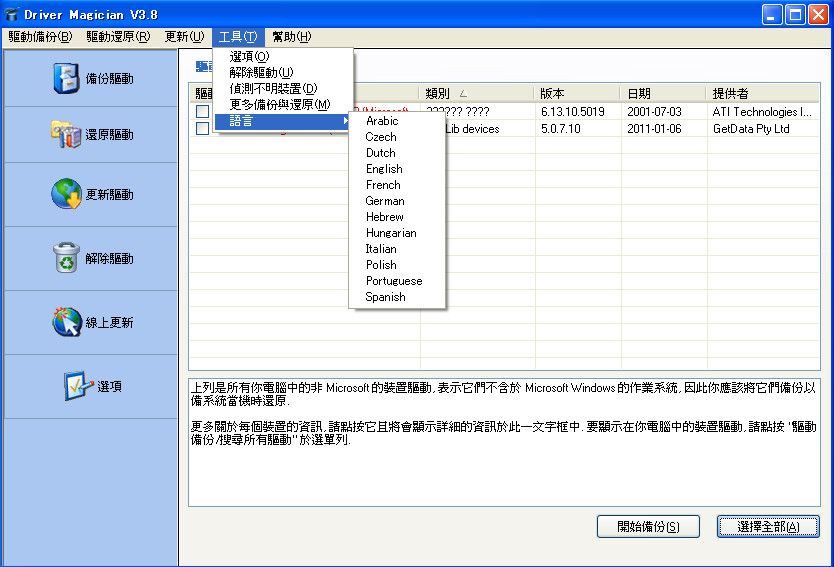
2011年9月23日 星期五

Portable Driver Magician 3.62 TW

[軟體名稱] Driver Magician
[版本語言] v3.62 繁中(多語言)版
[官方網頁] http://www.drivermagician.com/
[隨身封裝] 7z 點我下載 (4.4 MB - 30天免空下載限制)
[隨身免裝] 7z 點我下載 (2.7 MB - 30天免空下載限制)
[解壓密碼] 無
[軟體概要] 實用的驅動程式更新與備份工具軟體


Driver Magician offers a professional solution for device drivers backup, restoration, update and removal in Windows operating system. It identifies all the hardware in the system, extracts their associated drivers from the hard disk and backs them up to a location of your choice. Then when you format and reinstall/upgrade your operating system, you can restore all the "saved" drivers just as if you had the original driver diskettes in your hands. After one system reboot, your PC will be loaded and running with the required hardware drivers.

What's more, Driver Magician has a built in database of the latest drivers with the ability to go to the Internet to receive the driver updates. It saves lots of time to find the correct drivers and mature drivers will obviously increase the performance of hardware. If there are unknown devices in your PC, Driver Magician helps you detect them easily and quickly with its built in hardware identifier database.

Key features:

- Back up device drivers of your computer in four modes.
- Restore device drivers from backup in one mouse click.
- Update device drivers of your PC to improve system performance and stability.
- Uninstall device drivers
- Live Update device identifier database and driver update database.
- Detect unknown devices.
- Back up more items such as My Documents and desktop.
- Restore more items from backup.
- Get detailed information of the hardware drivers.
- Clone all drivers to an auto-setup package (.exe), so you can restore drivers without installing Driver Magician.


p.s.1:隨身封裝
1--用WinRaR解壓到任何地方(或USB)為單一隨身版xxx(ThinApp).exe
2--此版為Thinstall封裝製作,解壓後無法再次解壓
3--已加註容許32位元的軟體執行於64位元


p.s.2:隨身免裝
1--用WinRaR解壓到任何地方(或USB)為單一Portable_xxx.exe
2--此版為AutoRUn壓縮製作,也可再用WinRAR將exe檔再次解壓為目錄
3--已破解,內附註冊與使用說明

2011年2月27日 星期日

Portable Driver Magician 3.6 TW

[軟體名稱] Driver Magician
[版本語言] v3.6  繁中版 / 英語版
[官方網頁] http://www.drivermagician.com/
[隨身封裝] 7z  繁中版下載 / 英語版下載 (3.0 MB - 30天下載限制)
[隨身免裝] 7z  繁中版下載 / 英語版下載 (3.6 MB - 30天下載限制)
[解壓密碼] 無
[軟體概要] 一款簡易實用的驅動程式備份與還原的工具軟體


Driver Magician offers a professional solution for device drivers backup, restoration, update and removal in Windows operating system. It identifies all the hardware in the system, extracts their associated drivers from the hard disk and backs them up to a location of your choice. Then when you format and reinstall/upgrade your operating system, you can restore all the "saved" drivers just as if you had the original driver diskettes in your hands. After one system reboot, your PC will be loaded and running with the required hardware drivers.
What's more, Driver Magician has a built in database of the latest drivers with the ability to go to the Internet to receive the driver updates. It saves lots of time to find the correct drivers and mature drivers will obviously increase the performance of hardware. If there are unknown devices in your PC, Driver Magician helps you detect them easily and quickly with its built in hardware identifier database.

Key features:
- Back up device drivers of your computer in four modes.
- Restore device drivers from backup in one mouse click.
- Update device drivers of your PC to improve system performance and stability.
- Uninstall device drivers
- Live Update device identifier database and driver update database.
- Detect unknown devices.
- Back up more items such as My Documents and desktop.
- Restore more items from backup.
- Get detailed information of the hardware drivers.
- Clone all drivers to an auto-setup package (.exe), so you can restore drivers without installing Driver Magician.

p.s.1:隨身封裝
1--用WinRaR解壓到任何地方(或USB)為單一隨身版xxx(ThinApp).exe
2--此為壓縮封裝製作,解壓後無法再次解壓

p.s.2:隨身免裝
1--用WinRaR解壓到任何地方(或USB)為單一隨身版Portable_xxx.exe
2--也可再用WinRar將Portable_xxx.exe解壓為資料匣,成為免安裝版(建議方式,起動較快)
3--内附説明